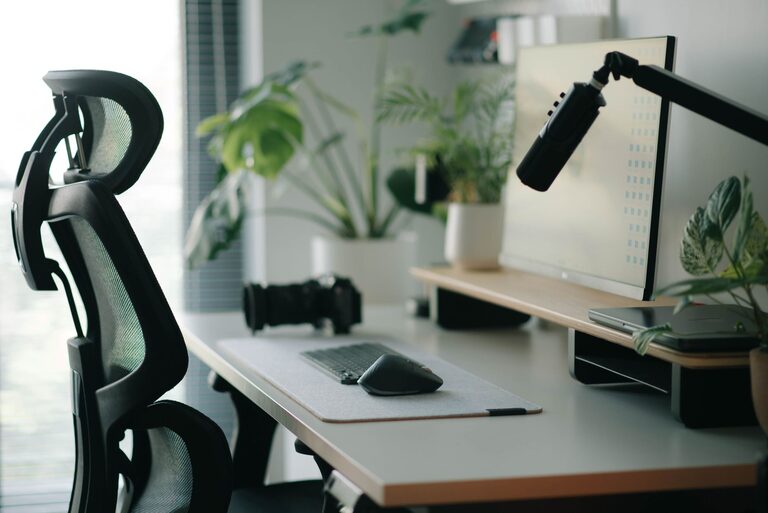
Creating a workspace that supports both focus and comfort can make a significant difference in your productivity and overall well-being. Whether you work from home, in an office, or study remotely, your desk setup plays a crucial role in shaping your day. This guide offers practical tips to help you design a desk setup that enhances concentration while keeping you comfortable throughout the day.
Why a Good Desk Setup Matters
Your desk is more than just a surface to place your computer—it’s the foundation for your work habits and daily routine. A well-organized, ergonomic setup reduces physical strain, limits distractions, and helps you maintain focus for longer periods. On the other hand, a cluttered or uncomfortable workspace can lead to fatigue, poor posture, and decreased productivity.
Choosing the Right Desk and Chair
Ergonomic Desk Height
– The ideal desk height is generally about 28 to 30 inches from the floor, but this varies depending on your height.
– When seated, your elbows should rest comfortably at a 90-degree angle on the desk surface.
– Adjustable desks or standing desks offer flexibility to alternate between sitting and standing, which can improve circulation and reduce discomfort.
Comfortable Chair with Support
– Choose a chair that supports the natural curve of your spine. Look for adjustable lumbar support.
– Your feet should rest flat on the floor or on a footrest.
– The chair height should allow your knees to be level with or slightly below your hips.
Positioning Your Monitor and Devices
Monitor Placement
– Position your monitor directly in front of you, about an arm’s length away.
– The top of the screen should be at or just below eye level to reduce neck strain.
– Use a monitor stand or riser if needed to achieve the correct height.
Keyboard and Mouse Setup
– Keep your keyboard and mouse close to avoid overreaching.
– Your wrists should be straight and relaxed when typing or clicking.
– Consider using a wrist rest for additional comfort.
Lighting for Focus and Reduced Eye Strain
– Use natural light when possible, but avoid glare on your screen by positioning your desk perpendicular to windows.
– Add a desk lamp with adjustable brightness and color temperature to reduce eye strain.
– Aim for balanced lighting that minimizes harsh shadows and screen reflections.
Organize Your Desk for Efficiency
Declutter Regularly
– Keep only essential items on your desk to reduce distractions.
– Use drawers or organizers to store supplies and paperwork.
Use Storage Solutions
– Desk organizers, trays, and shelves help keep items in place and easy to find.
– Cable management tools can prevent tangles and mess.
Add Personal Touches Without Overcrowding
– A small plant can improve air quality and add a calming natural element.
– Personal photos or artwork can increase comfort and motivation but keep them minimal to avoid distractions.
Incorporate Break Reminders and Movement
– A timer or productivity app can remind you to take short breaks every hour.
– Stretch or walk around briefly to relieve tension and refresh your mind.
Adjust for Your Specific Needs
Everyone’s preferences and requirements differ. Experiment with your setup to find what feels most comfortable and productive for you. Don’t hesitate to invest in quality ergonomic accessories if you spend many hours at your desk.
—
By carefully considering your desk, chair, monitor placement, lighting, and organization, you can create a workspace that supports your focus and comfort. Small adjustments can lead to big improvements in your daily work experience. Start rearranging your desk today for a more productive tomorrow!
About the Author